Bookmap

Bookmap is the only software I use. It is the only trading software I work with. This is not investment advice and not a promise that the software will suit you.
What Bookmap is
Bookmap is trading and analysis software that shows the full market order book and live order flow in a single view. Instead of only a conventional price line, you can see where limit orders rest in the book and where volume is actually executed. Bookmap describes this for futures (including CME and other major exchanges), stocks (including feeds such as Nasdaq TotalView), and crypto on major exchanges, among other markets. What you actually see depends on your license, your data connection, and the exchange entitlements in place.
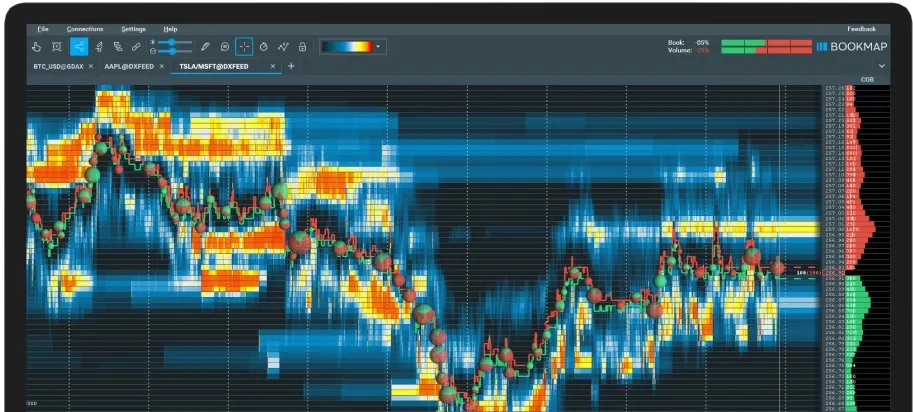
Heatmap, volume, and the order book
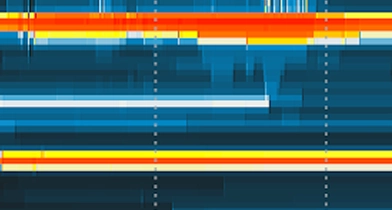
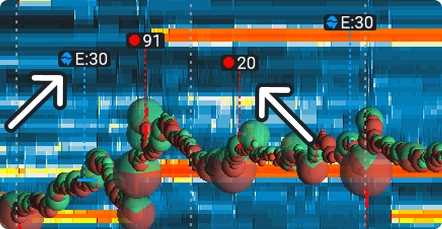
Liquidity Heatmap
The liquidity heatmap shows resting limit orders in the book: brighter areas typically indicate stronger supply or demand. This is a visualization of depth, not a forecast.
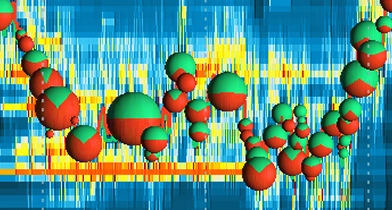
Volume Bubbles
Volume Bubbles (volume dots) show executed volume at each price. The size and position of the bubbles follow traded volume — they are not a signal to copy.
Best Bid & Offer
Bookmap can display the best bid and best offer on the chart, that is, the current best buy and sell sides of the book.
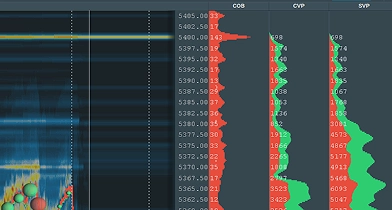
Current Order Book / DOM
The current order book (DOM, also called Current Order Book in Bookmap) shows full depth beside the chart, including typical volume-profile columns when those are enabled in your view.
Zoom, recording, and other tools
Bookmap also describes very fine time resolution (Nanosecond Zoom) and Record & Replay: you can record sessions and play them back later. Which features are included in your package is stated by the provider.
Add-ons: stops, icebergs, and more
In addition to the core view, Bookmap offers add-ons. Officially named examples include the Stops & Icebergs Tracker, Tradermap Pro, Market Pulse, and DOM Pro. The Stops & Icebergs Tracker is designed to mark visible stop and iceberg activity on the chart. According to the Bookmap knowledge base, the on-chart add-on works only with CME MBO real-time data from Rithmic or Bookmap Data, typically in non-aggregated mode, and is part of the MBO Bundle. Detection can vary by connection. Which add-ons are included in which package, and which data they require, should be checked directly with Bookmap.
Market data connections
Bookmap can connect to various market-data and execution providers. In its public connectivity documentation, Bookmap names dxFeed, Rithmic, and BookmapData, among others such as CQG, Gain, IQFeed, and Transact. Rithmic and BookmapData are listed with CME MBO and full depth when the required entitlements are in place. dxFeed does not provide MBO data. For CME and ICE futures, Bookmap describes dxFeed with full depth — that is not the same as individual order IDs and priority information. If you use dxFeed, do not expect MBO-based tools to work. Whether a connection works with your broker, prop-firm environment, or license has to be checked in the specific setup.
More on data connections, MBO, and dxFeed is also in the platforms knowledge article.
Prices and plans
I do not list fixed prices here. Bookmap publicly lists several packages, including Digital, Global, Global+, and Global Premium. Digital is described as a starting option, including crypto as well as delayed futures and stock data. What is currently included, and what it costs, is stated only by the provider. Check current prices and plans directly with Bookmap.
Current prices and plans at Bookmap
Special Offers
Affiliate link: I may receive a commission; nothing changes for you.
Sources
- Bookmap · Features
Official feature description: heatmap, Volume Bubbles, Best Bid & Offer, Current Order Book, add-ons, and markets. Checked 10 Nov 2026.
- Bookmap · Connectivity
Public connectivity documentation on data connections, including dxFeed, Rithmic, and BookmapData. dxFeed does not provide MBO data. Checked 10 Nov 2026.
- Bookmap · Stops & Icebergs
Knowledge base for the Stops & Icebergs On-Chart add-on and the CME MBO data requirement via Rithmic or Bookmap Data. Checked 10 Nov 2026.
Images/logo: Bookmap
This is not investment advice and not an invitation to buy Bookmap or an evaluation. Software and market data do not replace your own review of the rules, costs, and risks.